
The Employee Self Service (ESS) is a program using the County’s Intranet that gives you the ability to view your pay stubs and employment information as well as make changes to your personal, deposit, and tax withholding information.
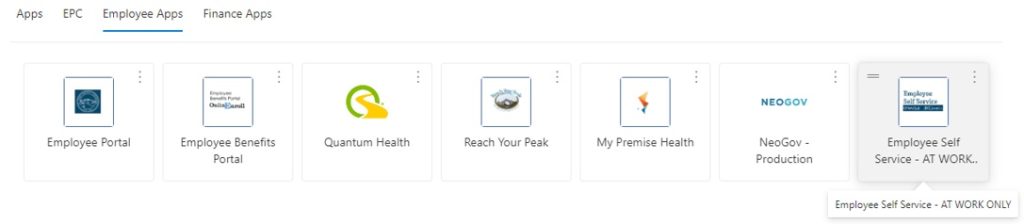
Full-Time Employees: Benefits Enrollment must be completed on the Employee Benefits Portal from OnlinEnroll at umr.workterra.net. To add it to your My Apps, search for the “Employee Benefits Portal” app. (This is not the same application at the “Employee Portal.”)
Employee Self Service (ESS)
Enter your User ID and Password as shown below and then click on the “Sign In” button.
USER ID: __ __ __ __ __ __ (Find on NeoGov, click your name in the top-right, then click “My Profile”)
PASSWORD: First 4 digits of your SSN (Or the password you previously selected)
If you are unable to remember your password: Click the Reset Password link under the Sign In fields – a password reset link will be sent to your County email address.

ESS is divided into the categories below:
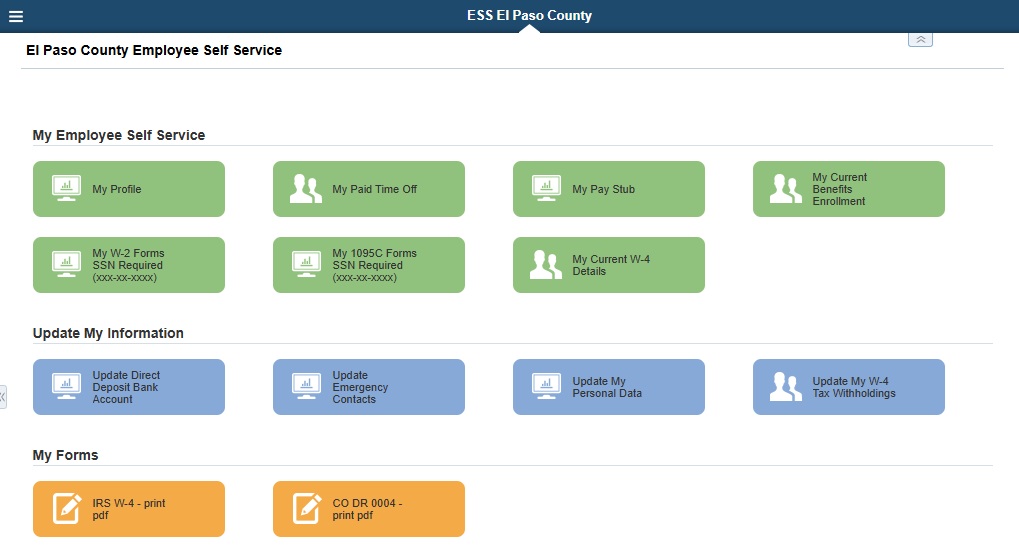
My Employee Self Service
- My Profile –View your current information, including your address, phone number, job title, and department.
- My Paid Time Off –View your accrued sick and vacation leave balances as of the last pay period. Please note: Timing variances will occur as to time accrued and time taken. Personal Holiday information is not available on ESS.
- My Pay Stub – View and print your pay stubs.
- My Current Benefits Enrollment* – This section is no longer used; log in to the Employee Benefits Portal (OnlinEnroll) for benefits information.
- My W2 Forms – Access your annual W-2 tax forms.*
- My 1095C Forms – Access your annual 1095-C Employer-Provided Health Insurance Offer and Coverage tax forms.*
- My Current W-4 Details – View your current W-4 details.
Update My Information
- Update Direct Deposit Bank Account – Submit changes for your direct deposit.
- Update Emergency Contacts – Submit changes to your emergency contact(s).
- Update My Personal Data – Submit changes to your address, phone number(s), personal e-mail address, marital status, or veteran status.
- Update My W-4 Tax Withholdings – Submit changes to your tax withholdings.
*When accessing a tax form, the password will be your Social Security number with dashes (xxx-xx-xxxx).